
I forget skincare in weird ways.
Not always the whole routine.
Sometimes I forget the one step that mattered most. The retinoid night. The recovery night. The sunscreen reapply. The product I was supposed to pause because my skin felt hot yesterday.
That is why a basic reminder is not always enough.
A phone alarm can tell you to wash your face. It cannot tell you whether tonight is the night for retinol, whether your barrier has been complaining all week, or whether the serum you keep blaming was only used twice before you changed three other things.
That is the gap a good skin care reminder app should fill.
Not pressure.
Clarity.
The best app is not the one with the most features. It is the one that catches the exact way your routine falls apart. For some people, that means a simple checklist. For others, it means product history, progress photos, ingredient context, or a calendar that makes alternating actives almost impossible to mess up.
If you want the broader app roundup after this, best skin care reminder app 2026 is the wider comparison. This piece is narrower. It is about the moment when a reminder has to do more than buzz.
Quick answer
If I had to choose fast, I would split the category like this:
| Image | App | Best for | Skip if |
|---|---|---|---|
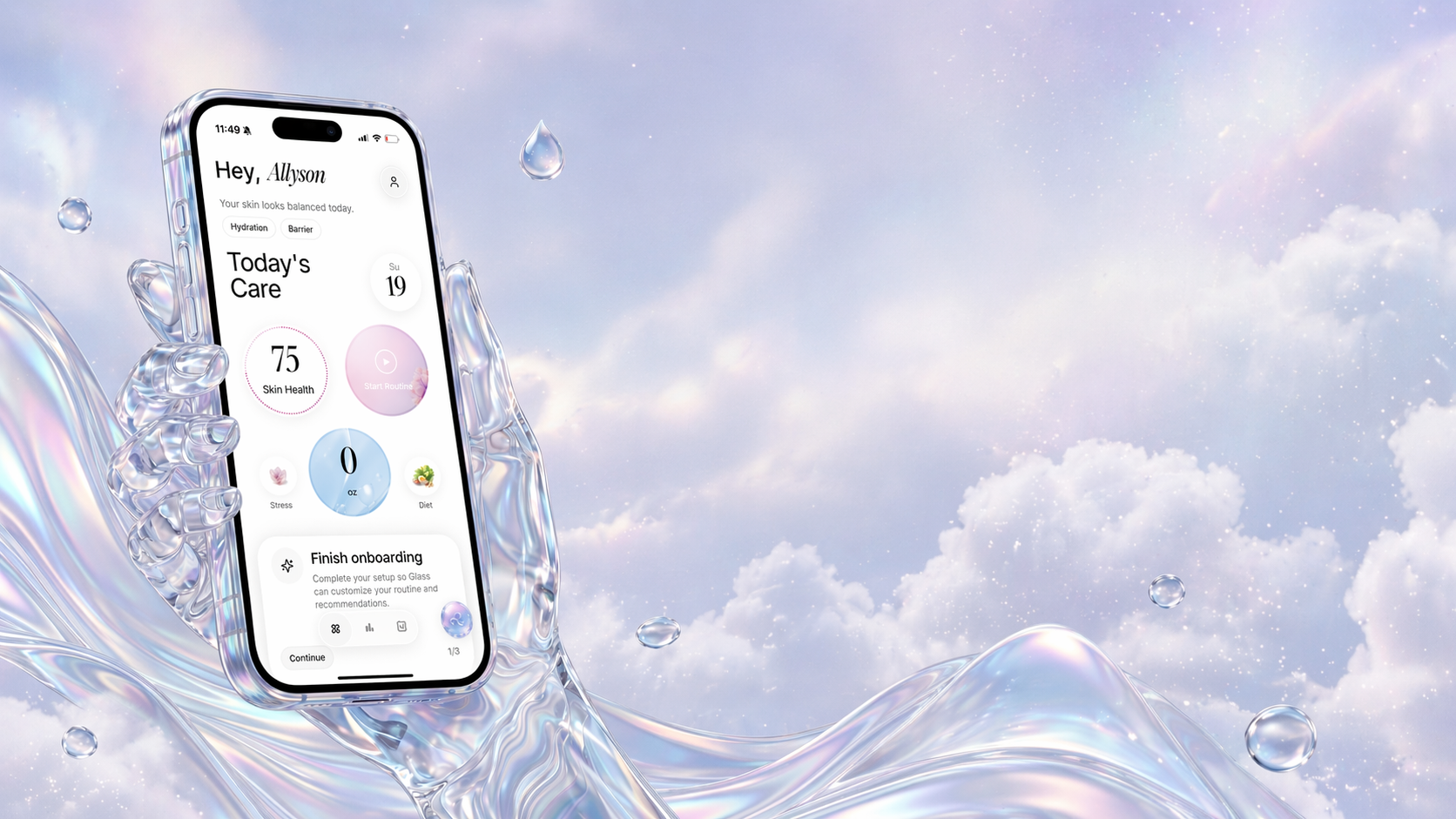 | Glass | Routine tracking tied to skin scans and visible progress | You only want a generic habit checklist |
 | Skin Bliss | Ingredient-aware routines and product matching | You want the quietest possible reminder app |
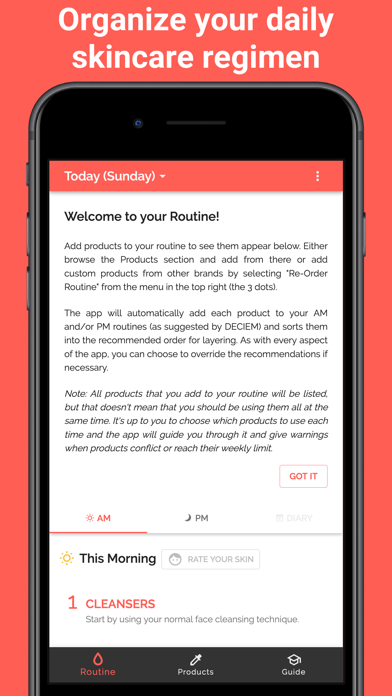 | Skincare Routine | Layering order, DECIEM-heavy routines, and one-time purchase simplicity | You want a free app first |
 | FeelinMySkin | Scheduling masks, treatments, and less frequent routine steps | You need deep skin analysis first |
 | SkinSort | Product scanning plus routine logging | You already know your products and only need reminders |
 | Charm | A broader beauty and skincare companion feel | You get overwhelmed by content-heavy apps |
 | Skincare Routine Diary | Android widgets, product usage, and skin-condition logging | You are on iPhone and want an iOS-native setup |
For most people, I would not start by downloading five of these.
I would start by naming the failure.
Do you forget the routine entirely? Do you forget which active you used last night? Do you forget whether a product helped or just happened to be around during a better skin week? Do you keep buying things because you cannot see the pattern in what you already own?
That answer matters more than the app store rating.
The best reminder app depends on what you forget
There are four different problems hiding under “I need a skincare reminder.”
The first is a habit problem. You simply forget to do the morning or night routine. For that, a simple reminder and checklist may be enough.
The second is a schedule problem. You do skincare, but you forget whether tonight is retinol, exfoliation, recovery, mask, or nothing. This is where a normal to-do app starts to feel clumsy.
The third is a product-memory problem. You cannot remember when you opened something, how often you used it, or whether your skin changed after adding it.
The fourth is a progress problem. You take photos, but the photos float away from the routine context. You can see that your skin looked better or worse, but you cannot remember what changed.
A good skin care reminder app should make at least one of those problems easier. A great one should connect two or three of them without making the routine feel like admin work.
That is the standard I would use.
Glass is the best fit when you want reminders tied to actual progress
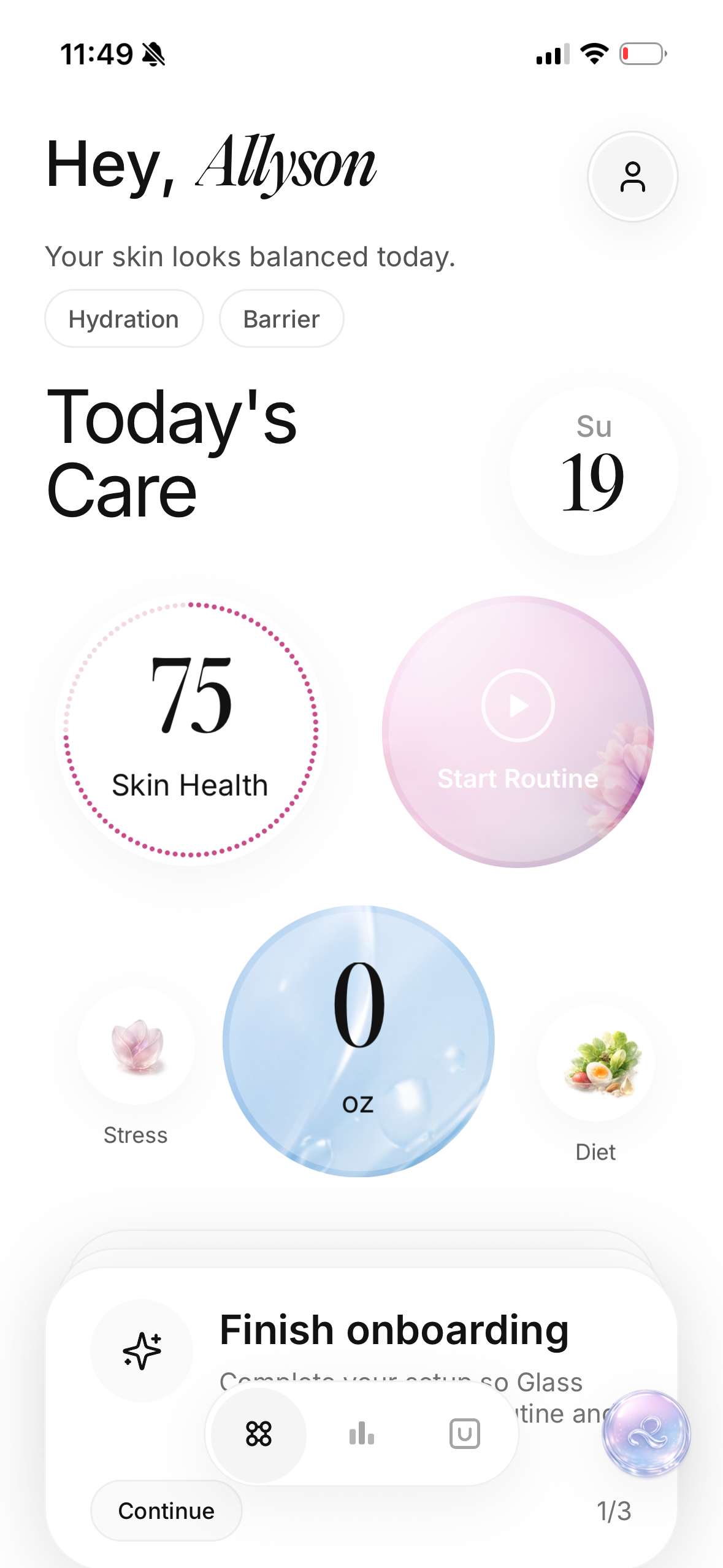
Glass makes the most sense when the reminder is not the whole job.
If you only want a ping at 9 p.m., your phone can already do that. Glass is more useful when you want the routine, skin scans, products, and progress history to sit in the same system. That matters because skincare is not just about whether you completed a task. It is about whether the task was worth repeating.
The biggest advantage is context.
When I look at a routine tracker, I do not just want to know that I used a moisturizer. I want to know whether my skin looked calmer during the weeks I actually used it. I want to know whether my breakouts lined up with a new product, a missed routine, or the fact that I kept changing the routine every three days.
That is where Glass feels different from a plain checklist. It is built around the idea that skincare is easier to improve when you can see the pattern. The scan history and reporting side make the reminder feel less like a chore and more like evidence.
Choose Glass if your real question is, “What is working?”
Skip it if you only want the lightest possible habit app and do not care about skin scans, product context, or progress tracking.
If the routine itself is still messy, I would pair this with how to build a skincare routine you will actually follow before adding more products.
Skin Bliss is strongest when products and ingredients are the messy part

Skin Bliss is the app I would look at when the routine is messy because the product decisions are messy.
Some people do not need help remembering cleanser, moisturizer, and sunscreen. They need help understanding whether the products in front of them make sense together. They need ingredient context, product matching, and a routine builder that does more than say “step one, step two, step three.”
That is Skin Bliss territory.
It is especially useful if you are the kind of person who stands in an aisle comparing ingredient lists, then goes home and still does not know where the product belongs. It has a stronger product-intelligence feel than a simple reminder app, and that can be helpful if you are trying to reduce guessing.
The tradeoff is weight. If you are already overwhelmed, a smarter app can still feel like more app than you wanted. Sometimes the best tool is not the one that knows the most. It is the one that gets you to do the simple routine three nights in a row.
Choose Skin Bliss if ingredients, product matching, and routine logic are your bottleneck.
Skip it if you already know your products and mainly need a calm evening nudge.
Skincare Routine is the clean pick for layering order and active scheduling
Skincare Routine is the one I would consider if your main fear is using things in the wrong order.
That sounds basic until you are staring at a cleanser, hydrating serum, azelaic acid, retinoid, moisturizer, oil, and sunscreen and wondering which mistake is making your face sting. Layering order is not everything, but it does matter enough that a dedicated routine-order app can be useful.
The strongest fit is someone with a product-heavy routine, especially if The Ordinary or other active-focused products are involved. This is also a good lane if you prefer a one-time paid app over a subscription mood.
What I like about this kind of app is that it reduces decision fatigue. You do not have to re-argue the routine with yourself every night. You set the routine, check what is due, and move through the list.
The risk is that order can become a distraction from tolerance. A perfectly ordered routine can still be too strong. If your skin burns, flakes, or gets red, the answer is not always “reorder the products.” Sometimes the answer is fewer products.
Choose Skincare Routine if layering and alternating actives are your weak spot.
Skip it if you want free-first progress tracking with skin photos and broader routine reporting.
FeelinMySkin is useful for the steps you do not do every day
The hardest skincare steps to remember are not always daily.
Daily routines become muscle memory. The once-a-week mask, the every-third-night exfoliant, the two-week check-in photo, the monthly product cleanout, the treatment you meant to repeat but never scheduled: those are the steps that disappear.
FeelinMySkin fits that problem well.
It has more of a skincare calendar and assistant feel. I would think about it for someone who wants to schedule masks, treatments, product usage, and routine notes without turning every night into a spreadsheet.
This is also a good reminder that skincare tracking is not only for beginners. People with bigger routines often need more help, not less, because the routine has more moving parts. The mask day, exfoliation day, and recovery day all blur together if you are relying on memory.
Choose FeelinMySkin if your routine includes treatments that happen on different rhythms.
Skip it if your main goal is scan-based progress tracking or deeper ingredient analysis.
SkinSort is better when the reminder starts before you buy

SkinSort is not just a reminder app. That is the point.
It makes more sense if your skincare problem begins before the routine even starts. You buy a product, forget why you bought it, cannot tell if it fits your goals, and then add it anyway because it is already sitting on the counter.
That is how routines get crowded.
The scanner and product-discovery side can help if you want more context before committing something to your face for the next month. Then the routine tracking side gives you a place to log what you are actually using.
I would not choose it as the simplest reminder system. I would choose it if the reminder needs to live next to product decisions. If your shelf is already full of half-used products that all claim to brighten, hydrate, smooth, or calm, that extra context can save you from adding another duplicate.
Choose SkinSort if shopping and routine tracking are tangled together.
Skip it if you do not need product scanning and only want a focused daily checklist.
Charm is the broader companion, not the quietest tracker

Charm is the kind of app that makes more sense if you want the skincare habit to feel like part of a bigger beauty routine.
That can be a good thing.
Some people stay consistent because the app feels more engaging. They like content, routines, habit-building, and a more companion-like experience. If a bare checklist feels too cold, Charm may be easier to return to.
The tradeoff is focus. If your problem is very specific, like “I forget whether I used retinol last night,” a broader app can feel like a lot of surface area around a small need. That is not wrong. It just means you should be honest about whether extra content helps you or pulls you away from the routine.
Choose Charm if you want a more all-around skincare and beauty companion.
Skip it if you want the cleanest possible tracker with minimal distraction.
Skincare Routine Diary is the Android widget lane
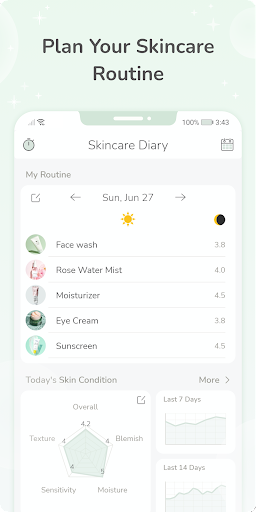
Skincare Routine Diary stands out for one simple reason: widgets.
That sounds small, but it is not. If the reminder stays buried inside an app, some people will ignore it. If the routine sits on the home screen, it becomes harder to avoid and easier to check without turning it into a whole session.
This is the lane I would consider for Android users who want product usage, skin condition reports, expiration tracking, and a visible routine prompt. The expiration piece is underrated too. A reminder app should not only help you use products more consistently. It should help you stop keeping old products around because you cannot remember when you opened them.
The main limitation is platform fit. If you are on iPhone, this is not your cleanest path. If you are on Android and want visibility, it is worth considering.
Choose Skincare Routine Diary if Android widgets would genuinely help you stay consistent.
Skip it if you want an iPhone-first app or a more polished scan-and-progress system.
When Apple Reminders is enough
I would not pretend everyone needs a dedicated skincare app.
Some people need the opposite. They need fewer systems.
Apple Reminders, Google Tasks, Streaks, Habitify, Finch, or a whiteboard calendar can work if your routine is simple and the only problem is repetition. A basic setup might look like this:
- Morning: cleanser or rinse, moisturizer, sunscreen
- Night: cleanse, treatment if scheduled, moisturizer
- Monday and Thursday: retinoid
- Wednesday: exfoliation
- Sunday: progress photo
If that solves the problem, stop there.
The reason to upgrade is when the generic system stops answering the skincare-specific questions. A task app can tell you that you completed “retinol.” It may not help you see that your skin got irritated the week you used retinol three times, skipped moisturizer twice, and added a new vitamin C serum.
That is when a skincare-specific app earns its place.
If the issue is timing instead of app choice, skin care schedule app 2026 and morning and night skincare routine order 2026 are better next reads.
The mistake I would avoid with any reminder app
Do not use reminders to force a bad routine.
This is the trap.
You build a ten-step morning routine and a nine-step night routine, then ask an app to make you more disciplined. But the problem is not discipline. The routine is too heavy, too active, too unclear, or too hard to repeat on a normal tired night.
A good reminder app should make the routine more honest.
If you keep skipping a step, ask why. Maybe it pills under sunscreen. Maybe it stings. Maybe it is redundant. Maybe it belongs three nights a week instead of every night. Maybe you bought it because it sounded smart, but your skin never asked for it.
Tracking should help you edit.
Not just comply.
How I would choose one
If I were choosing today, I would use this filter:
- If I want routine reminders plus skin scans and progress history, I would use Glass.
- If I want product and ingredient intelligence, I would use Skin Bliss or SkinSort.
- If I want layering order and active scheduling, I would use Skincare Routine.
- If I want mask days and treatment scheduling, I would use FeelinMySkin.
- If I am on Android and want home-screen widgets, I would try Skincare Routine Diary.
- If my routine has three steps and no actives, I would start with a normal reminder app.
That is the cleanest way to avoid downloading something impressive that does not match your actual problem.
My final pick
If your goal is just “remind me to do skincare,” start simple.
If your goal is “help me understand what is working,” I would choose Glass.
That distinction matters.
Skincare reminders are useful, but they are not the finish line. The better question is whether the routine becomes easier to repeat and easier to understand. If an app helps you see that your skin looks calmer after consistent sunscreen, fewer exfoliation nights, and one moisturizer you actually use, that is more valuable than another streak badge.
The app should make your routine smaller, clearer, and easier to trust.
That is what I would look for in May 2026.
Not the loudest app.
The one that helps you stop guessing.
FAQ
What is the best skin care reminder app in May 2026?
For routine reminders tied to progress tracking, Glass is the strongest fit. For ingredient-heavy routines, Skin Bliss and SkinSort make more sense. For layering order and active schedules, Skincare Routine is a cleaner pick.
Do I need a skincare app if I already use phone reminders?
Not always. Phone reminders are enough if your routine is simple and you only need a nudge. A skincare app is more useful when you need product history, progress photos, skin scans, active scheduling, or help seeing what changed over time.
What should a skincare reminder app track?
At minimum, it should track morning and night routine completion. Better apps also track products used, active nights, progress photos or scans, skin notes, skipped steps, and product changes so you can connect habits to visible results.
Are skincare routine apps worth paying for?
They can be if they replace wasted products or help you avoid routine mistakes. A one-time paid app may be worth it for layering help, while a more advanced app may be worth it if scans, reports, or product analysis help you stay consistent.
What if I keep ignoring the reminders?
Make the routine smaller. A reminder cannot fix a routine you secretly hate doing. Start with cleanser, moisturizer, sunscreen, and one treatment schedule. Once that feels normal, add complexity only if your skin actually needs it.
