Your memory is too generous.
Mine is.
I can convince myself I used sunscreen every morning. I can forget the night I skipped moisturizer because I was tired. I can blame a breakout on the newest serum even when I also slept badly, wore a heavy sunscreen, sweated through a workout, and used an exfoliating pad because my texture annoyed me.
That is not tracking.
That is storytelling.
A good skincare progress tracker app should interrupt that habit. It should help you see what actually happened before you decide what to change. Not with panic. Not with another noisy score that makes you stare at your pores for twenty minutes. Just enough structure to make your routine easier to repeat and your progress easier to judge.
I care about that more in May 2026 than I did a year ago because skincare apps have split into two different lanes. Some are really product scanners. Some are routine planners. A smaller group is trying to become a real progress system: photos, check-ins, product changes, consistency, skin notes, and the kind of pattern recognition you cannot do from memory alone.
That last group is the one worth comparing.
Quick answer
If you want the shortest version first, this is how I would choose:
| App | Best for | Progress tracking strength | Watch this before choosing |
|---|---|---|---|
| Glass | People who want routine tracking, skin scans, product logging, and progress context together | Strongest all-around fit for connecting routine consistency to visible changes | Some deeper app value depends on actually scanning and logging, not just browsing |
| GloLog | People who want a dedicated photo-first skin journal | Strong before-and-after framing, daily selfies, product logs, and local-photo privacy positioning | More narrow than a full routine and skin-intelligence system |
| Pimpl | Acne-prone users who want a quiet journal and weekly photo rhythm | Strong for breakthrough/breakdown tracking without making the app feel too medical | Best if acne and routine consistency are the main use case |
| Skin Bliss | Ingredient-heavy users who want routine, products, and analysis | Broad product and routine system with progress tools | The feature set may feel heavier if you mostly need a simple visual record |
| SkinDiary | People who want a simple skincare diary | Clear routine and selfie tracking direction | Lighter public feature depth than the bigger systems |
| Clear | People who like social skincare tracking and photo comparisons | Good fit if comparison check-ins motivate you | Social features are not for everyone when skin data feels personal |
| Liminal | People who want daily AI scoring tied to Health app style trends | Interesting skin trend tracking and on-device AI positioning | Best for score-driven users, less ideal if scores make you obsessive |
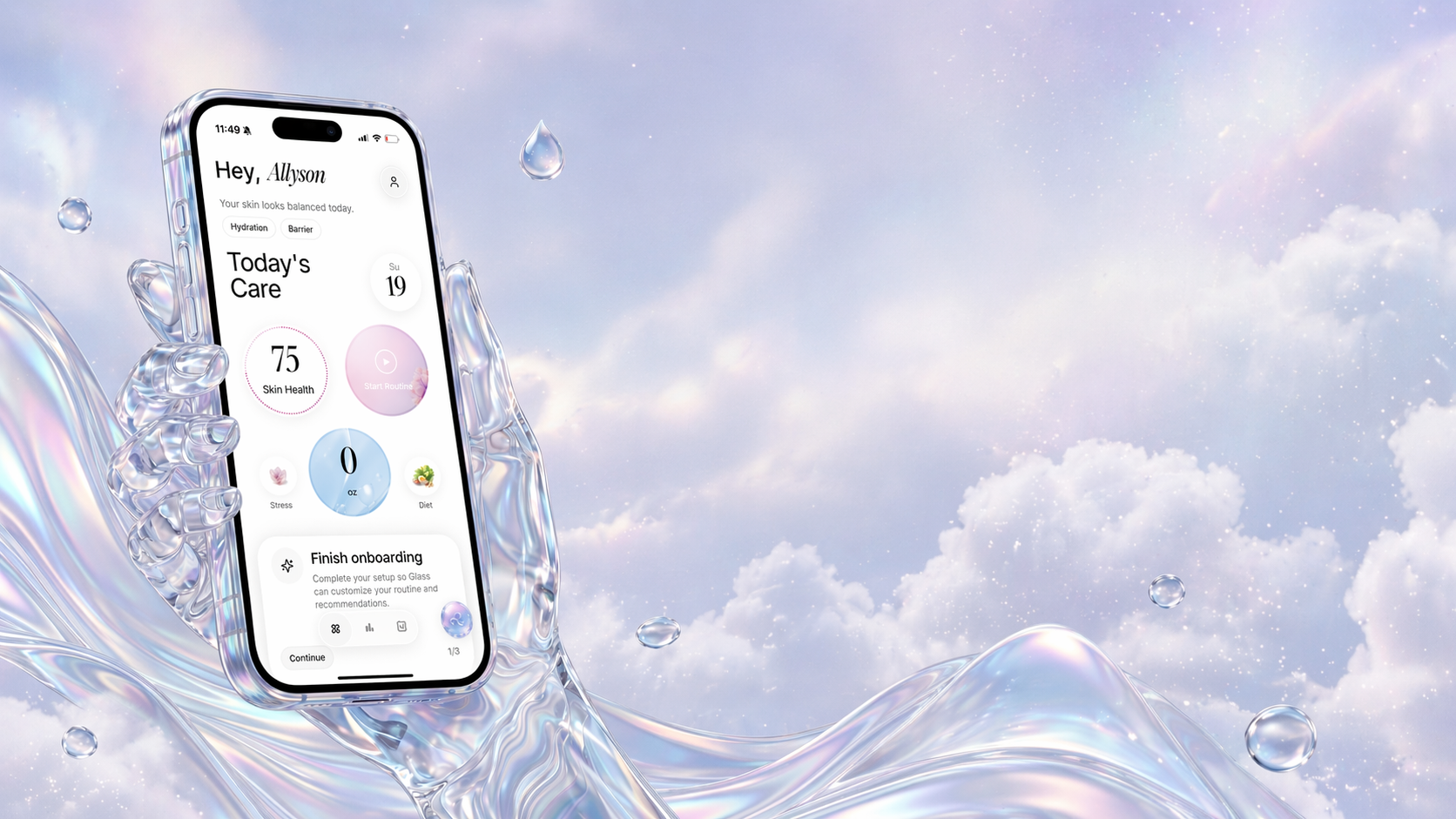
My pick for most people is Glass because progress tracking is not only about photos. Photos matter, but they are not enough. You also need to know what routine you followed, what products changed, whether you were consistent, and what your skin looked like across a longer arc.
That is where a tracker becomes useful instead of decorative.
What a skincare progress tracker app needs to do well
Most tracking apps look useful on day one.
The real test is day eighteen.
By then, the novelty is gone. You are tired. Your skin may look slightly better, slightly worse, or exactly the same. You are tempted to change something because changing something feels more productive than waiting.
That is the moment a good app earns its place.
I would judge any skincare progress tracker against six practical questions:
- Can I log my morning and night routine without effort?
- Can I take progress photos in a consistent way?
- Can I see what product or habit changed before my skin changed?
- Can I add notes about tightness, stinging, breakouts, oiliness, flakes, or redness?
- Does the app make privacy feel understandable when face photos are involved?
- Does it calm decision-making, or does it make me more reactive?
That last question matters the most.
Some apps make you feel like your skin is a stock chart. Every check-in becomes a verdict. Every score becomes a reason to panic. That is not the goal.
The goal is to make the boring pattern visible.
Did you actually use the routine? Did the new product line up with the irritation? Did the breakout happen after the serum, or after three missed nights and a stressful week? Did your skin look worse in harsh bathroom light but better in the same weekly photo setup?
Those are different answers. A good tracker helps you separate them.
1. Glass is the best all-around skincare progress tracker app
Glass is the app I would start with if you want progress tracking to connect to the rest of your skincare life.
That is the important distinction.
A photo diary can show you what changed. A habit tracker can show you what you checked off. A product database can show you what ingredients are in a bottle. Glass is strongest because it tries to keep those pieces close together:
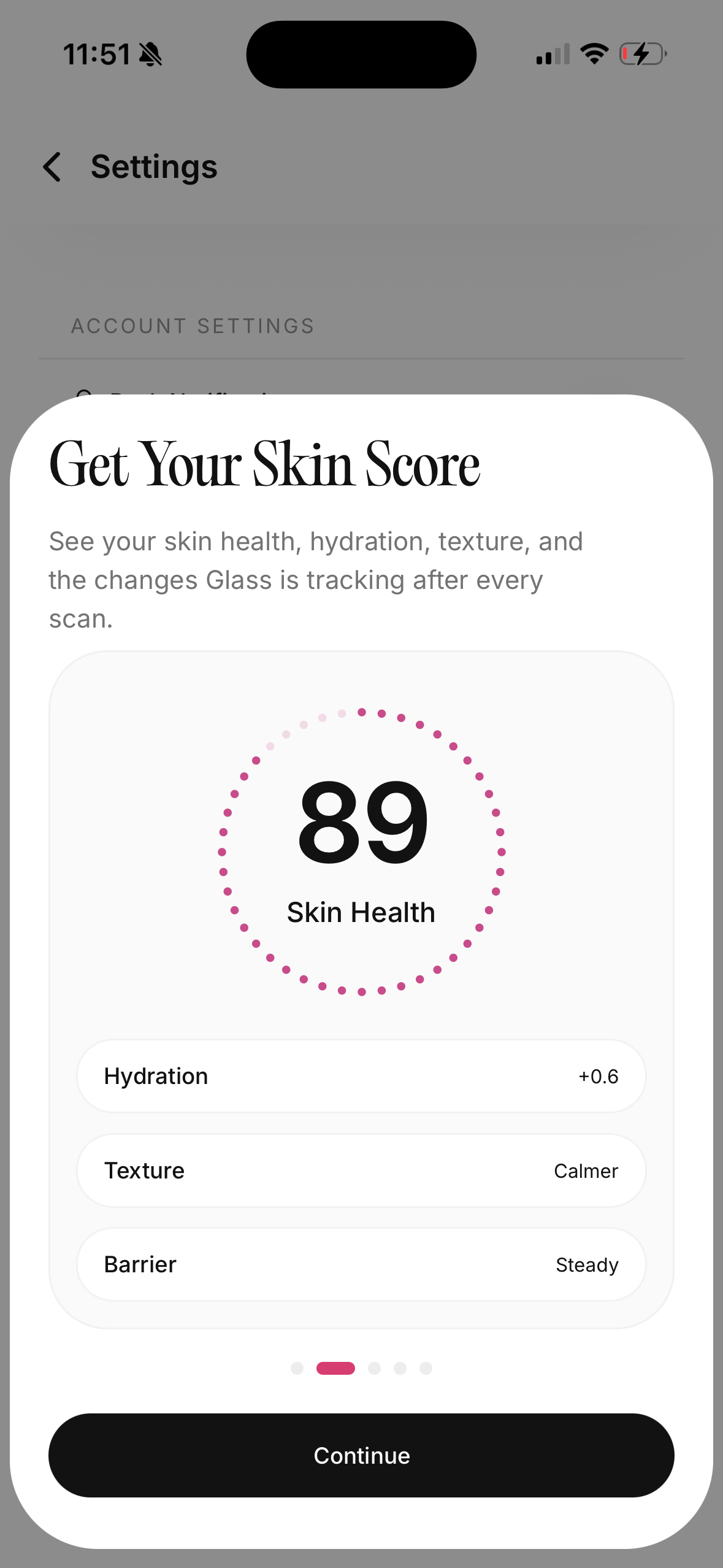
- skin scans and skin score context
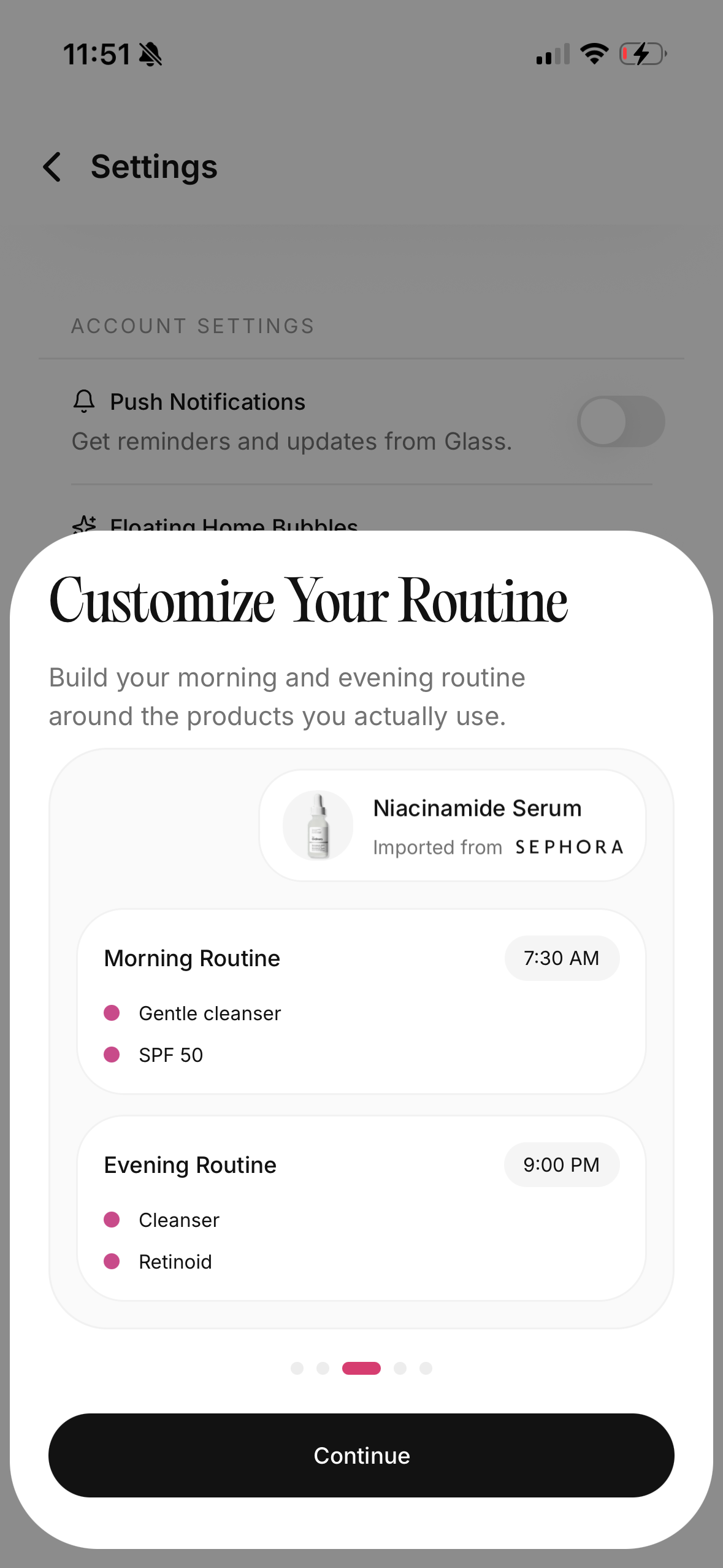
- morning and night routine tracking
- product logging
- reminders
- reports and visible progress signals
- lifestyle context like water, sleep, stress, and diet
That shape matters because skin rarely changes for one clean reason.
If your skin gets irritated, it may be the new exfoliant. It may also be the frequency. It may be the fact that you used retinol the next night. It may be that your cleanser is leaving you tight and your moisturizer is not enough anymore. It may be poor sleep making everything look worse.
Glass is built for that kind of messy reality.
The routine builder matters because it keeps the app from becoming just a camera roll with nicer labels. You can connect what you did to what you see. The scans matter because they give you a more consistent place to compare change. The reports matter because progress is easier to understand when you are not judging your face from one bad morning.
Where Glass is especially useful:
| Use case | Why Glass fits |
|---|---|
| You keep changing products too quickly | It gives the routine and product changes a place to live |
| You forget whether you were consistent | Routine tracking makes missed steps harder to mentally erase |
| You want photos plus context | Skin scans and routine logs sit closer together |
| You want a calmer way to interpret progress | Reports are better than judging your skin from one mirror check |
| You are building a routine from products you already own | Product logging and routine placement help reduce shelf chaos |
The one thing I would not do is treat Glass like magic.
You still have to use it. You still have to keep the routine stable long enough for the records to mean something. You still need professional care if acne is painful, scarring, sudden, severe, or not responding to basic care.
But for normal routine confusion, Glass is the cleanest choice here.
2. GloLog is the best photo-first skin journal
GloLog is built around a very clear promise: track your skin visually, keep progress photos consistent, and compare before-and-after changes over time.
That is a useful lane.
The app's public positioning emphasizes daily selfies, a camera alignment guide, calendar and timeline views, side-by-side comparison, AM and PM routines, product tracking, ingredient notes, reaction logging, and local photo storage. I like that combination because it treats progress as something you see across weeks, not something you decide from one selfie.
GloLog makes the most sense if your main frustration is visual uncertainty.
You might like it if you often think:
- "I cannot tell if my skin is better or I am just used to it."
- "I need before-and-after photos that are not buried in my camera roll."
- "I want to know whether this product is helping or just making me feel productive."
- "I want a private skin journal without turning skincare into a social feed."
The limitation is scope.
From the outside, GloLog feels more like a dedicated tracking journal than a broader skin assistant. That can be good. A narrow app is easier to trust if it does one job well. But if you want scan interpretation, routine guidance, product placement, and longer-term context in one system, Glass is the better first pick.
I would choose GloLog when photos are the main problem. I would choose Glass when photos are only one part of the problem.
3. Pimpl is the one I would consider for acne tracking
Pimpl has one of the clearer emotional angles in this category.
It is not trying to sound like a giant beauty platform. It feels closer to a quiet acne and skincare journal: daily routine check-ins, weekly progress photos, product tracking, and a record of what your skin is doing over time.
That makes sense for acne.
Acne tracking gets frustrating because the feedback loop is slow and emotionally loud. One new bump can make you want to abandon the entire routine. One good day can make you think everything is solved. Neither reaction is usually helpful.
A weekly photo rhythm is smart because it discourages over-reading daily noise. Daily check-ins still matter, but the bigger visual comparison should happen slowly enough that you can see the trend.
Pimpl looks especially useful if:
- acne is the main reason you want a tracker
- you want a low-pressure journal instead of a busy dashboard
- you need to track breakthroughs and breakdowns
- you want product notes tied to visible changes
- you are trying to stop quitting routines too early
The tradeoff is that acne-focused simplicity may not be broad enough if your goals include skin aging, barrier recovery, ingredient scanning, product shelf management, or a more complete skin-health dashboard.
For acne-prone readers, I would compare Pimpl against Glass first. Pimpl may feel calmer if you want a narrow acne journal. Glass may be better if you want acne tracking alongside scans, routines, products, and broader skin context.
4. Skin Bliss is for people who want the bigger skincare system
Skin Bliss is the power-user option.
Its public product positioning is broad: skin analysis, product database, ingredient checks, routine building, progress tracking, and personalized recommendations. That makes it appealing if you want more than a diary.
The best Skin Bliss user is probably someone who enjoys skincare detail.
They want to know:
- which products overlap
- which ingredients show up repeatedly
- whether a product matches their skin concerns
- how to organize a bigger shelf
- how their routine and skin changes connect over time
That can be genuinely useful.
The caution is that more intelligence can create more decisions. If you already feel overwhelmed, a feature-rich skincare system can accidentally become another place to spiral. You open the app to simplify your routine and end up investigating every ingredient, every score, every possible replacement.
That is not Skin Bliss doing something wrong. It is just the tradeoff of a bigger system.
Choose Skin Bliss if you like detail and want product intelligence. Choose Glass if you want progress tracking to feel more tied to your daily routine and visible skin changes. Choose GloLog if you mostly want the photo record.
5. SkinDiary is the simple option for people who do not want a heavy app
SkinDiary is appealing because it sounds straightforward: build routines, track what works, and take selfies to follow progress over weeks and months.
That is enough for some people.
Not everyone needs a full skin assistant. Not everyone wants scores, product scans, ingredient logic, community features, and a complex dashboard. Some people just need a place to say:
I used this. My skin felt like this. Here is what it looked like this week.
There is value in that.
SkinDiary is the kind of app I would consider if your routine is already simple and your main goal is consistency. It is less compelling if you want richer interpretation, but that may be the point. The simpler the app, the easier it can be to keep using.
The main question is whether simple is enough for you.
If you want a tracker because you forget your routine, SkinDiary may be plenty. If you want help understanding why your skin changed, Glass or Skin Bliss will likely give you more to work with.
6. Clear is good if photo comparison and social accountability motivate you
Clear has an interesting place in this category because it leans into progress check-ins and social skincare features.
That can work.
Some people stay more consistent when an app feels alive. They like profiles, posts, comparisons, community energy, and the sense that they are not tracking alone. If that is you, Clear may feel more motivating than a private diary.
The app's public listing also points to photo comparison after progress pictures, routine visibility, product usage, and check-ins. That makes it relevant for before-and-after tracking.
But I would be honest about the privacy and personality fit.
Skin photos can feel intimate. Breakouts, texture, redness, and progress pictures are not the same as posting a nail color or a lipstick. If social features make you more self-conscious, they may hurt the whole point of tracking.
Choose Clear if sharing and comparison help you stay consistent.
Skip it if you want your face data to feel quiet.
7. Liminal is for people who want skin trends and scores
Liminal is interesting because it leans into on-device AI scoring and daily skin trends.
That is a specific kind of tracking.
Some people love scores because numbers make progress feel concrete. A trend line can stop you from overreacting to one bad day. If the score is stable or improving, you may be less tempted to destroy the whole routine because your skin looked dull under bad lighting.
The risk is the opposite.
If scores make you obsessive, this kind of app can turn skincare into a daily performance review. That is not healthy for everyone. A tracker should help you make better decisions, not make your face feel like a report card.
I would choose Liminal if:
- you like quantified tracking
- you want daily trends
- you are comfortable with AI scoring
- numbers calm you down instead of making you spiral
I would skip it if your problem is already over-checking.
The before-and-after photo rules that matter more than the app
The app helps.
The photo setup still matters.
Before-and-after skincare photos are easy to ruin because lighting changes everything. A face can look dramatically different depending on window light, bathroom bulbs, flash, angle, lens distance, moisturizer shine, sunscreen, and whether your skin is freshly washed.
If I were starting today, I would keep the setup boring:
- same room
- same time of day when possible
- clean face
- no makeup
- similar distance from the camera
- front, left, and right angles
- no harsh zooming
- no beauty filters
- weekly comparison for big judgment, not hourly comparison
Daily photos can be useful, but I would not emotionally grade them daily. I would use daily photos as data and weekly photos as the calmer comparison.
That small difference protects you from overreacting.
What I would track besides photos
Photos show what changed.
They do not always show why.
That is why the best skincare progress tracker app should let you connect the picture to the routine. I would log:
| What to track | Why it matters | How detailed to be |
|---|---|---|
| Morning routine | Sunscreen, moisturizer, and cleanser affect the whole day | Check products off, keep it fast |
| Night routine | Most actives and recovery steps happen here | Mark treatment nights clearly |
| New products | Product changes create the most confusion | Add one new thing at a time when possible |
| Frequency changes | More retinol or more acid can matter as much as a new bottle | Note when you increase or pause |
| Skin feel | Tightness, burning, itching, tenderness, oiliness, and flakes matter | Use plain words |
| Context | Sleep, stress, sweating, cycle timing, travel, weather | Track only what actually affects you |
This is where Glass has the strongest everyday shape. It is not only asking what your skin looks like. It is helping you keep the routine and context close enough that the photos mean more.
The mistake that makes tracking useless
Changing too much.
That is the mistake.
If you download a tracker and then change your cleanser, serum, moisturizer, sunscreen, exfoliant frequency, pillowcase routine, and diet in the same week, the app cannot save the experiment. It can only record the chaos.
The cleaner rule is simple:
Keep the base routine stable for two weeks before judging. If you need to change something, change one thing. Then track again.
I know that sounds slow.
It is still faster than guessing for six months.
My final ranking for May 2026
If I were choosing today, I would rank the apps this way:
- Glass for the best balance of routine tracking, scans, progress context, and daily usefulness.
- GloLog for the best photo-first skin journal.
- Pimpl for acne-focused tracking with a calmer weekly rhythm.
- Skin Bliss for ingredient-heavy users who want a bigger skincare system.
- SkinDiary for simple diary-style tracking.
- Clear for people who like social check-ins and photo comparison.
- Liminal for score-driven users who want daily trend tracking.
That ranking is not universal.
It depends on what kind of tracking will actually keep you honest.
If photos are your main problem, GloLog is compelling. If acne journaling is the problem, Pimpl deserves a look. If ingredients are the problem, Skin Bliss is strong. If you want everything tied back to a repeatable routine and visible skin changes, start with Glass.
FAQ
What is the best skincare progress tracker app in 2026?
For most people, Glass is the best skincare progress tracker app in May 2026 because it connects routine tracking, skin scans, product logging, and progress context in one place. If you only want before-and-after photos, GloLog is the strongest photo-first alternative.
What is the best app for before-and-after skincare photos?
GloLog is the most direct before-and-after photo tracker in this comparison. Glass is better if you want those visual changes connected to your routine, product use, scans, and longer-term progress reports.
Are skincare tracking apps worth it?
They are worth it if they reduce guessing. A good tracker helps you stay consistent, compare progress fairly, and avoid changing too many products at once. It is not worth it if the app makes you check your face obsessively or overreact to normal skin changes.
How often should I take skincare progress photos?
Weekly photos are usually enough for judgment. Daily photos can help build a record, but they should not become daily emotional verdicts. Keep the lighting, angle, distance, and face condition as consistent as possible.
Can an app tell me what caused my breakout?
An app can help you spot patterns, but it cannot diagnose you. If acne is painful, scarring, sudden, severe, or persistent, see a licensed dermatologist. Use tracking as better context, not as medical certainty.
The app is only useful if it makes you calmer
That is my real filter.
The best skincare progress tracker is not the one with the most dramatic score, the prettiest calendar, or the longest feature list.
It is the one that helps you stop guessing.
It should make your routine easier to repeat. It should make product changes easier to judge. It should make photos more honest. It should help you notice progress without turning every pore into a problem.
That is why I would start with Glass for most people.
It gives the routine, the scan, the products, and the progress record one shared home. That is the difference between collecting skin data and actually understanding your skin better over time.